You’re juggling a full dining room, a skeleton crew, three no-shows, and a phone that won’t stop ringing — all before 7 PM on a Friday. Sound familiar? For most independent restaurant owners, scheduling is one of the biggest silent killers of revenue, staff morale, and sanity. Between managing reservations, coordinating staff shifts, handling last-minute cancellations, and trying to predict busy periods, the administrative load is relentless. The good news? AI scheduling for restaurant owners has matured rapidly, and today’s tools can take the bulk of that chaos off your plate — literally and figuratively.
This guide breaks down exactly how to use AI scheduling to transform your restaurant’s operations, reviews the five best tools on the market right now, and helps you figure out which solution fits your specific situation — whether you’re a solo owner running a 20-seat café or managing a multi-location operation with dozens of employees.

Table of Contents
- Why AI Scheduling Matters for Restaurant Owners
- What to Look for in an AI Scheduling Tool
- 1. Housecall Pro
- 2. Jotform
- 3. 7shifts
- 4. OpenTable
- 5. Resy
- Quick Comparison Table
- The Bottom Line
- Frequently Asked Questions
Why AI Scheduling Matters for Restaurant Owners
Before diving into the tools themselves, it’s worth understanding why the shift to AI scheduling for restaurant owners is not just a trend — it’s a survival strategy. According to the National Restaurant Association’s State of the Industry Report, labor costs and operational complexity remain the top challenges facing independent restaurant operators year after year. Understaffing leads to poor guest experiences. Overstaffing hemorrhages payroll. And manual scheduling — whether you’re using a whiteboard, a spreadsheet, or memory — introduces costly human errors into both of those equations.
AI scheduling tools solve these problems in a few key ways:
- Demand forecasting: AI analyzes historical traffic data, local events, weather patterns, and even social media activity to predict how busy you’ll be on any given shift, so you staff appropriately.
- Automated booking management: Reservation tools with AI can handle confirmations, reminders, waitlist management, and even cancellations without any manual intervention.
- Staff scheduling optimization: Instead of you spending Sunday night building next week’s schedule, AI tools generate optimized schedules based on availability, labor laws, role requirements, and budget constraints.
- Reduced no-shows: Automated reminder sequences via SMS and email dramatically reduce the rate of reservation no-shows — a major revenue leak for most restaurants.
- Real-time adjustments: When someone calls in sick at 4 PM before a dinner rush, AI-assisted tools can identify available staff and send shift-fill requests automatically.
The result? Restaurant owners who implement AI scheduling consistently report saving 5–10 hours per week on administrative tasks, reducing labor costs by 3–8%, and improving staff retention because schedules are fairer and more predictable. If you’ve been reading about the best AI chatbots for restaurant owners, you already know that automation is reshaping every corner of the restaurant business — scheduling is the next frontier to tackle.
What to Look for in an AI Scheduling Tool
Not every scheduling platform is built with restaurant operations in mind. Before committing to any software, restaurant owners should evaluate tools on these specific criteria:
- Integration capability: Does it connect with your POS system, payroll software, and communication tools?
- Ease of use for staff: If your team can’t figure out how to use the app within 10 minutes, adoption will stall.
- Mobile accessibility: Staff need to view and swap shifts from their phones. A mobile-first design is non-negotiable.
- Customizable forms and workflows: Every restaurant runs differently. Look for tools that let you customize intake forms, booking flows, and scheduling rules to match your operation.
- Pricing transparency: Per-location, per-user, or flat monthly fees — understand the cost structure before you scale.
- Customer support: When something goes wrong on a Saturday night, you need responsive support.
With those filters in mind, here are the five best tools for implementing AI scheduling in your restaurant right now.

1. Housecall Pro
Best for: Restaurant owners and food service operators who want an all-in-one scheduling, booking, and customer communication platform with powerful automation built in
Housecall Pro has become one of the most versatile AI-powered scheduling platforms available to small business owners, and restaurant operators are discovering just how well it fits their needs. Originally built for home service businesses, Housecall Pro has expanded its feature set to serve any business that needs to manage appointments, bookings, customer communications, and team coordination from a single dashboard. For restaurant owners managing private dining events, catering bookings, recurring reservations, or staff dispatch, it’s an exceptionally capable tool.
What sets Housecall Pro apart in the world of AI scheduling for restaurant owners is its intelligent automation engine. The platform can automatically send booking confirmations, pre-service reminders, and post-visit follow-up messages — all triggered by scheduling activity without any manual effort. If a guest books a private dining event, they receive an immediate confirmation, a reminder 48 hours before, and a thank-you message afterward asking for a review. All of that happens without you lifting a finger.
The scheduling interface is clean and intuitive. You can view your team’s availability at a glance, assign bookings to specific staff members, block off unavailable time, and manage recurring clients. The mobile app is excellent — both for owners and for team members who need to check their schedules or receive updates on the go.
Housecall Pro also integrates with a range of third-party tools including QuickBooks, Google Calendar, and various payment processors, making it easy to slot into an existing operational stack. For restaurant owners who are also juggling catering, private events, food truck operations, or any kind of service call model, this platform handles the complexity beautifully.
Key Features
- AI-assisted automated booking confirmations and reminders via SMS and email
- Drag-and-drop scheduling calendar with real-time team availability
- Customer management (CRM) built into the scheduling workflow
- Online booking portal that customers can use 24/7
- Automated review request sequences after each booking
- Payment collection integrated into booking confirmations
- Mobile app for owners and staff
- Integration with QuickBooks, Stripe, and Google Calendar
Pricing
Housecall Pro offers plans starting at approximately $79/month for the Basic plan, with more advanced plans available as your operation grows. Pricing scales based on the number of users and features required. A free trial is available.
👉 Try Housecall Pro here: www.housecallpro.com

2. Jotform
Best for: Restaurant owners who need highly customizable booking forms, reservation intake systems, and automated workflows without coding knowledge
Jotform is one of the most flexible and powerful form-and-workflow tools available to small business owners, and its scheduling and booking capabilities make it an excellent companion — or even primary solution — for restaurant operations. If you’ve ever wished you could build an exactly perfect reservation form, event booking flow, or staff availability intake process without hiring a developer, Jotform is the answer.
When it comes to AI scheduling for restaurant owners, Jotform shines in the customization department. You can create multi-step reservation forms that collect party size, dietary restrictions, occasion type (birthday, anniversary, corporate), seating preferences, and payment deposits — all in a single branded flow. Jotform’s AI-assisted form builder can suggest field types, validate inputs, and even help you set up conditional logic so that your form adapts based on what customers enter.
The platform’s appointment scheduler (Jotform Booking) integrates directly with your calendar and allows customers to select available time slots in real time. You can set buffer times between reservations, block out unavailable dates, and automatically send confirmation and reminder emails. For private dining rooms, wine dinners, cooking classes, or any event-style reservation, Jotform’s flexible setup handles the complexity that rigid restaurant platforms often can’t accommodate.
Beyond front-of-house reservations, Jotform is equally powerful for staff-side scheduling. You can create shift availability forms, vacation request workflows, and onboarding intake forms that feed directly into your management processes. Jotform’s integration with Google Sheets, Airtable, Slack, and hundreds of other tools means your data flows exactly where you need it.
Key Features
- Drag-and-drop form builder with AI-assisted field suggestions
- Jotform Booking for real-time appointment and reservation scheduling
- Conditional logic for dynamic, adaptive booking forms
- Payment collection via Stripe, PayPal, and Square
- Automated email and SMS confirmations and reminders
- Staff availability and shift request forms
- Integration with 150+ apps including Google Calendar, Slack, Airtable
- White-label branding options
Pricing
Jotform offers a generous free plan with basic functionality. Paid plans start at $34/month (Bronze) and scale up based on submission volume and advanced features. The Enterprise plan is available for larger operations.
👉 Try Jotform here: www.jotform.com
3. 7shifts
Best for: Restaurant owners focused primarily on employee scheduling, labor cost control, and team communication
7shifts is purpose-built for the restaurant industry, and it shows. While Housecall Pro and Jotform excel at customer-facing booking and broader workflow automation, 7shifts owns the employee scheduling side of the equation. If your biggest headache is building fair, compliant weekly schedules and keeping your labor costs in line, 7shifts is arguably the most specialized tool for exactly that job.
The platform’s AI scheduling engine analyzes your historical sales data, labor targets, and staff availability to auto-generate optimized weekly schedules. Instead of spending hours manually building a schedule that accounts for who’s available when, who has certifications for what roles, and what your labor budget allows, 7shifts does it in minutes. Restaurant owners using AI scheduling with 7shifts report reducing the time spent on schedule creation by up to 80%.
7shifts also includes a full communication suite — managers can push schedule updates, shift reminders, and announcements directly to staff through the app. Staff can request shift swaps, submit availability updates, and request time off, all within the platform. The manager approval workflow keeps control in your hands while dramatically reducing the back-and-forth over text and phone calls.
Key Features
- AI-generated optimized employee schedules based on sales forecasts and labor targets
- Labor cost tracking and real-time budget monitoring
- Shift swapping, time-off requests, and availability management
- Team messaging and announcement tools
- Integration with major restaurant POS systems (Toast, Square, Lightspeed)
- Tip pooling and payroll integration
- Mobile app for managers and staff
- Compliance tools for break and overtime rules
Pricing
7shifts offers a free plan for single-location restaurants with up to 30 employees. Paid plans start at $29.99/month per location. Enterprise pricing is available for multi-location operators.
👉 Try 7shifts here: www.7shifts.com
4. OpenTable
Best for: Full-service restaurants and fine dining operators who want AI-powered reservation management with built-in guest discovery and marketing reach
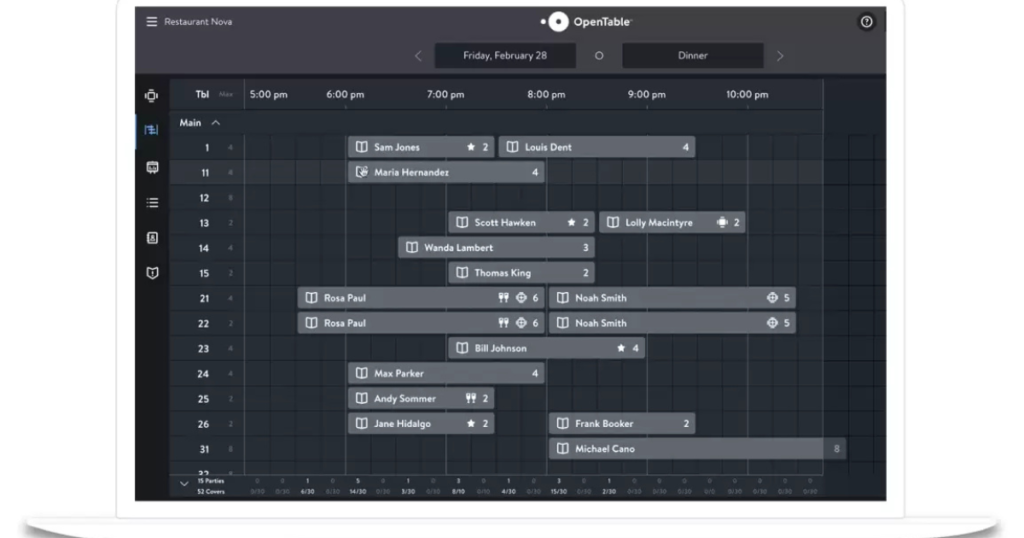
OpenTable is one of the most recognizable names in restaurant reservation technology, and its continued investment in AI has kept it highly relevant for modern operators. Beyond simply managing bookings, OpenTable’s AI layer helps restaurant owners understand guest behavior, optimize table turn times, and even attract new diners through the OpenTable network of millions of active users.
For restaurant owners exploring AI scheduling tools, OpenTable offers intelligent waitlist management, automated pre-shift reports that help you anticipate the night ahead, and smart table assignment that maximizes covers without overloading your kitchen. The guest relationship management features allow you to tag VIPs, track preferences, and personalize experiences in ways that build loyalty over time.
The marketing integration is a real differentiator — your restaurant appears to OpenTable’s network of diners actively searching for places to eat, adding a demand-generation function that pure scheduling tools don’t offer. If you’re also thinking about how AI can enhance customer-facing communications, you might find value in pairing OpenTable with tools from our guide to the best AI chatbots for restaurant owners.
Key Features
- AI-powered table management and reservation optimization
- Real-time waitlist and walk-in management
- Guest profiles with preference and visit history tracking
- Automated pre-shift reports and demand forecasting
- Marketing exposure on the OpenTable diner network
- Two-way SMS with guests for confirmation and waitlist updates
- Integration with POS systems and CRM tools
- Reporting and analytics dashboard
Pricing
OpenTable pricing is quote-based and typically includes a monthly platform fee plus per-cover charges. Plans generally start around $149–$449/month depending on features and reservation volume. Direct reservations from your own website have lower per-cover fees than network-sourced bookings.
👉 Try OpenTable here: restaurant.opentable.com
5. Resy
Best for: Trendy, high-demand, and experience-focused restaurants that want modern reservation management with strong hospitality CRM features
Resy has positioned itself as the premium alternative to OpenTable, particularly popular among independent restaurants, chef-driven concepts, and venues where the dining experience is as much about the brand as the food. Acquired by American Express, Resy benefits from deep integration with Amex’s cardholder ecosystem — a genuine competitive advantage for attracting high-spending diners.
Resy’s AI scheduling features focus heavily on the guest experience side of restaurant operations. The platform’s ResyOS includes smart pacing tools that prevent the kitchen from getting slammed during a rush, intelligent waitlist features, and a guest data management system that gives your front-of-house team real information before guests arrive. Knowing that Table 7 is celebrating their anniversary, prefers a quiet corner, and has a shellfish allergy — all surfaced automatically — is exactly what separates a memorable experience from a forgettable one.
For restaurant owners who care about brand perception and guest loyalty, Resy’s tools help translate scheduling data into meaningful hospitality intelligence. The platform also supports Notify (their waitlist notification feature), event ticketing for special dinners, and integration with third-party tools that round out a modern restaurant tech stack.
Key Features
- Smart table pacing and floor management tools
- Guest CRM with preference, allergy, and visit history tracking
- Automated waitlist management with SMS notifications
- Event and experience ticketing
- American Express cardholder integration and marketing benefits
- POS integrations including Toast, Aloha, and Square
- Shift notes and pre-service briefing features for FOH teams
- Reporting and revenue analytics
Pricing
Resy offers a free tier for small restaurants with basic functionality. Paid plans start around $249/month for ResyOS Pro, with higher tiers available for larger operations. Custom enterprise pricing is available for multi-location groups.
👉 Try Resy here: resy.com/restaurant-solutions
Quick Comparison Table: AI Scheduling Tools for Restaurant Owners
| Tool | Best For | Starting Price | Free Plan/Trial | Key AI Feature | Staff Scheduling | Guest Reservations |
|---|---|---|---|---|---|---|
| Housecall Pro | All-in-one booking + CRM automation | $79/month | Free trial | Automated booking workflows & reminders | ✅ Yes | ✅ Yes |
| Jotform | Custom booking forms & workflows | Free / $34/month | Free plan | AI form builder + conditional logic | ✅ Yes (forms) | ✅ Yes |
| 7shifts | Employee scheduling & labor costs | Free / $29.99/month | Free plan | AI-generated optimized staff schedules | ✅ Yes (primary) | ❌ Limited |
| OpenTable | Full-service reservation + marketing | ~$149/month | Demo available | Demand forecasting + guest insights | ❌ Limited | ✅ Yes (primary) |
| Resy | Experience-focused hospitality CRM | Free / $249/month | Free tier | Smart pacing + guest preference AI | ❌ Limited | ✅ Yes (primary) |
The Bottom Line
After reviewing all five tools, the clear recommendation for most restaurant owners looking to implement AI scheduling for restaurant operations is Housecall Pro as the primary platform. Here’s why: it bridges the gap between customer-facing booking automation and back-end team coordination better than any single tool in this space. The automated communication workflows alone — confirmations, reminders, follow-ups, review requests — eliminate hours of manual administrative work every week. And because it functions as a lightweight CRM alongside a scheduling tool, you’re building a valuable customer data asset at the same time.
For restaurant owners who need maximum flexibility in how they collect reservation data — especially for events, private dining, or non-standard booking flows — Jotform is an exceptional secondary recommendation. Its AI-assisted form builder and deep integration capabilities make it a powerful complement to any scheduling stack. Whether you use it standalone for custom booking intake or alongside Housecall Pro for specialized workflows, it earns its place in a modern restaurant’s tech toolkit.
If employee scheduling is your primary pain point, 7shifts is worth a serious look — its restaurant-specific labor management features are genuinely best-in-class. And if you’re a full-service or fine dining operator who wants reservation management plus marketing reach, OpenTable and Resy both deliver excellent platforms with strong AI features tailored to front-of-house operations.
The bottom line: you don’t have to keep managing your restaurant with spreadsheets and sticky notes. The tools to automate your scheduling intelligently exist, they’re affordable, and the time they save you pays back the investment many times over. Start with Housecall Pro for an all-in-one approach, layer in Jotform for customized booking workflows, and watch your administrative burden shrink while your guest experience improves.
Frequently Asked Questions
What exactly does AI scheduling do for a restaurant that a regular calendar app doesn’t?
A regular calendar app is passive — it records what you tell it. AI scheduling is active — it analyzes patterns, makes predictions, and takes action on your behalf. For restaurant owners, that means AI scheduling tools can forecast how busy a shift will be based on historical data and local events, automatically adjust your staffing recommendations, send booking confirmations and reminders without manual input, identify gaps in coverage before they become problems, and generate optimized employee schedules in minutes rather than hours. The core difference is that AI scheduling replaces decision-making labor, not just record-keeping labor.
Is AI scheduling for restaurant owners expensive to implement?
Not at all — and the ROI calculation is straightforward. Tools like Jotform and 7shifts offer free tiers that are genuinely useful for smaller operations. Paid plans for most platforms start between $29 and $149 per month. When you factor in the hours saved on schedule building, the reduction in no-shows from automated reminders, and the labor cost savings from better-optimized staffing, most restaurant owners recoup the monthly cost within the first week of use. The bigger risk is continuing to lose money on inefficiencies rather than spending a modest amount on tools that eliminate them.
Can I use AI scheduling tools if I’m a small, single-location restaurant?
Absolutely — in fact, AI scheduling tools often provide proportionally more value to small single-location restaurants than to large chains, because the owner or manager at a small restaurant is typically doing everything themselves. Every hour you save on administrative scheduling is an hour you can spend on food quality, staff development, or marketing. Tools like Jotform, 7shifts, and Housecall Pro are all designed with small operators in mind and offer pricing tiers that are accessible for single-location businesses.
How does AI scheduling help reduce restaurant no-shows?
No-shows are one of the most painful revenue problems in the restaurant industry. AI scheduling tools tackle this problem primarily through automated reminder sequences — sending confirmation emails at the time of booking, follow-up SMS messages 48 hours before the reservation, and a final reminder a few hours before the table time. Some platforms also enable credit card holds or deposits at the time of booking, which dramatically reduces no-show rates by creating financial accountability. OpenTable and Resy both offer these features natively, while Jotform and Housecall Pro allow you to build deposit collection directly into your booking workflow.
What’s the difference between AI scheduling tools for staff and tools for guest reservations? Do I need both?
These are genuinely two different problems, and the best tools in each category reflect that. Staff scheduling tools (like 7shifts) are focused on labor management — building optimized weekly schedules, managing shift swaps, tracking labor costs, and communicating with your team. Guest reservation tools (like OpenTable and Resy) are focused on the customer-facing side — managing bookings, waitlists, table assignments, and guest profiles. Some operators will benefit from both. If you want a single platform that handles a broad range of both challenges with strong automation, Housecall Pro is designed to be that all-in-one solution. For restaurants that have very high reservation volume or very complex staffing needs, using specialized tools for each function and integrating them together often delivers the best results.
Affiliate Disclosure: This article contains affiliate links. If you click a link and make a purchase or sign up for a service, we may earn a commission at no additional cost to you. We only recommend tools we have genuinely researched and believe provide real value to small business owners. Our editorial opinions are independent and are not influenced by affiliate relationships.